
In the online world, authenticity has become an important aspect. People want to know they are dealing with a reliable and genuine source. This also applies to businesses and brands. A professional WordPress website can help increase the authenticity of your brand.
Authenticity is important because it builds trust with your target audience. People want to know they are dealing with a real company that is honest and trustworthy. A professional WordPress website can help build this trust through a professional look and user-friendly functionalities.
A professional WordPress website offers several benefits that can help increase the authenticity of your brand. It offers flexibility and customisability, allowing you to personalise and adapt your website to your specific needs. In addition, WordPress is user-friendly, making it easy for you to manage and update your website yourself. Moreover, WordPress offers reliability and security, which is essential for building trust with your target audience.
Summary
- A professional WordPress website increases the authenticity of your brand.
- Advantages of a WordPress website include flexibility and user-friendliness.
- Creating a WordPress website starts with creating a site and choosing a design.
- Downloading and installing WordPress is an important step in the process.
- Customising your WordPress website is essential to emphasise authenticity.
Benefits of a WordPress website for authenticity
1. Flexibility and customisability: A professional WordPress website offers a lot of flexibility and customisability. You can choose from thousands of themes and plugins to shape your website exactly to your needs. This allows you to present your brand identity and values in a unique way.
2. Usability: WordPress is a user-friendly platform, even for those without technical knowledge. You can easily add pages and posts, upload images and videos, and customise your website. This allows you to quickly and easily keep your website up-to-date and provide your target audience with relevant information.
3. Ability to personalise: WordPress allows you to fully personalise your website. You can customise the design, change colours and fonts, add widgets and much more. This allows you to present your brand identity in a unique way and make your website stand out among the competition.
4. Reliability and security: WordPress is a reliable and secure platform. It is regularly updated to ensure that your website is protected against security threats. There are also numerous security plugins available that you can install to further improve the security of your website.
Step 1: Creating a site in WordPress
To create a professional WordPress website, you must first register with WordPress. Go to the WordPress website and click the "Get Started" button. Follow the instructions to create an account.
Next, you need to choose a domain name and hosting for your website. A domain name is the address of your website, for example www.mijndomein.nl. Hosting is the service that makes your website available online. There are several hosting providers available, so choose the one that best suits your needs.
After choosing a domain name and hosting, you need to install WordPress on your hosting account. This can usually be done through your hosting provider's control panel. Follow the instructions to install WordPress and create a username and password for your website.
Step 2: Creating a WordPress website
Now that you have installed WordPress, you can start creating your website. The first thing you need to do is choose a theme. A theme defines the look and layout of your website. There are thousands of free and premium themes available, so choose the one that best suits your brand.
After choosing a theme, you can start customising your website. Go to the WordPress dashboard and click on "View" and then "Customise". Here you can customise various aspects of your website, such as colours, fonts, backgrounds and much more.
In addition, you can add pages and posts to your website. Go to the WordPress dashboard and click on "Pages" and then "Add new page". Here you can enter and format the content of your page using WordPress' editor. You can also add posts in the same way.
Step 3: Download and install WordPress
If you want to download and install WordPress on your own server, you must first download the latest version of WordPress from the official website. Go to wordpress.org and click the "Download" button. Save the file on your computer.
Next, you need to install WordPress on your server. This can usually be done through your hosting provider's control panel. Log in to your hosting account and look for the option to install WordPress. Follow the instructions to install WordPress and create a username and password for your website.
After you have installed WordPress, you need to configure it. Go to your website and enter the username and password you created during installation. You will now be redirected to the WordPress dashboard, where you can adjust various settings, such as the language, time zone and permalink structure.
WordPress templates: Choose the right design for your brand
The design of your website is an important aspect of authenticity. It should match your brand identity and values. With WordPress, you can choose from thousands of templates to find the right design for your brand.
It is important to choose a template that matches your brand identity and values. Think about the colours, fonts and layout that suit your brand. Choose a template that looks professional and is easy to navigate for your target audience.
Once you have chosen a template, you can customise it to suit your specific needs. Adjust the colours and fonts, add your logo and customise the layout. This allows you to present your brand identity in a unique way and make your website stand out among the competition.
WordPress extensions: Increase the functionality of your website
WordPress offers numerous extensions that allow you to extend the functionality of your website. Extensions are small pieces of code that add extra features to your website, such as contact forms, social media integration, SEO optimisation and much more.
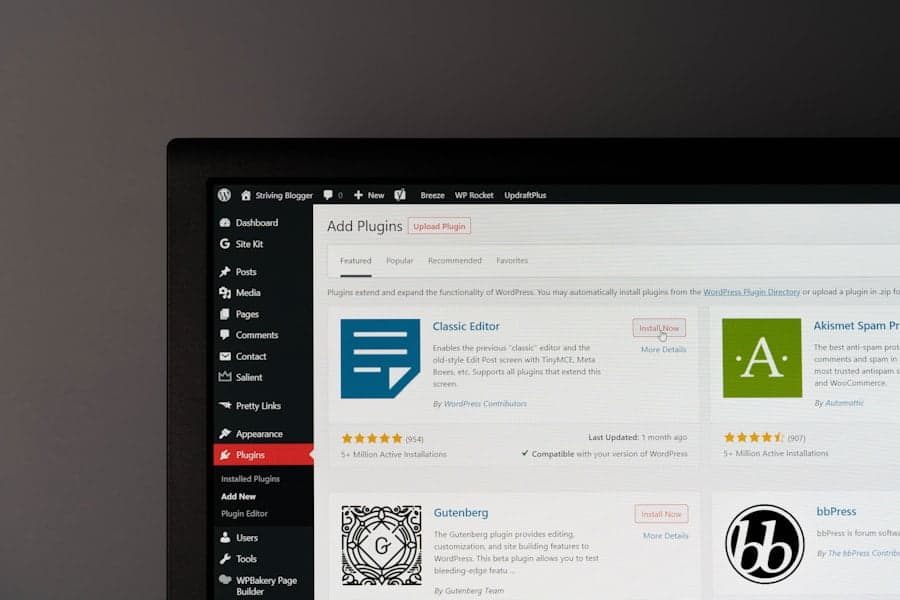
To find and install extensions, go to the WordPress dashboard and click on "Plugins" and then "Add new plugin". Here you can search for specific extensions or browse the available options. Click "Install" to install an extension and then "Activate" to enable it.
Some examples of useful extensions for authenticity are:
- Contact Form 7: Allows you to easily add contact forms to your website, making it easy for visitors to contact you.
- Yoast SEO: This extension helps you optimise your website for search engines so that you are more findable in search results.
- Social Media Share Buttons: Allows you to add social media buttons to your website, allowing visitors to share your content on social media.
How to customise your WordPress website to emphasise authenticity
To emphasise the authenticity of your website, there are several tweaks you can make.
1. The importance of consistency: Make sure your website is consistent in terms of colours, fonts and layout. This ensures a professional appearance and helps build recognition among your target audience.
2. Using images and videos: Use high-quality images and videos that match your brand identity. This helps present your brand visually and can help increase engagement with your target audience.
3. Adding testimonials and reviews: Add testimonials and reviews to your website to increase the trust of your target audience. This shows that other people have had positive experiences with your products or services.
4. Using social media: Integrate social media on your website by using buttons to share your content on social media. This increases the visibility of your brand and makes it easy for visitors to share your content with their network.
Tips for maintaining a professional WordPress website
To ensure that your professional WordPress website continues to perform optimally, there are a number of tips you can follow:
1. Regularly update WordPress and extensions: Make sure you regularly install the latest version of WordPress and the installed extensions. This will ensure that your website remains secure and up-to-date.
2. Back up your website: Back up your website regularly to ensure that you always have a copy of your website. This can come in handy if something goes wrong with your website.
3. Monitoring your website's performance: Monitor your website's performance, such as load time and visitor numbers. This will help you resolve any issues quickly and improve the user experience.
4. Securing your website: Make sure your website is properly secured to prevent hackers from accessing your data. Use strong passwords, install security plugins and regularly monitor your website for suspicious activity.
Conclusion: The power of a professional WordPress website for authenticity
A professional WordPress website can be a powerful tool to increase the authenticity of your brand. It offers flexibility, usability, personalisation, reliability and security. By following the steps to create and customise a WordPress website, you can create a professional and authentic online presence.
It is important to be consistent in the design and content of your website, use high-quality images and videos, add testimonials and reviews, and integrate social media. It is also essential to maintain your website regularly by performing updates, making backups, monitoring performance and ensuring security.
With a professional WordPress website, you can build the trust of your target audience and strengthen your brand authenticity. It is a worthwhile investment that can contribute to your company's success in the online world.
If you are looking for ways to increase the authenticity of your website, building a professional WordPress website is an excellent choice. A professional website can give your brand reliability and credibility. But what should you pay attention to when getting a website created? This article from Webtik.co.uk discusses some key points you should consider when getting a website created. In addition, Webtik.co.uk also offers a handy guide on how to build a website for free using a website builder. For more information, visit their blog.
FAQs
What is a professional WordPress website?
A professional WordPress website is a website designed and developed by an experienced web designer using the WordPress platform. It is a website tailored to the specific needs of the client and designed to have a professional look and feel.
Why is it important to have a professional WordPress website?
A professional WordPress website can help increase the authenticity of your business and strengthen your brand. It can also help improve your online presence and increase your customer base.
How can a professional WordPress website increase my authenticity?
A professional WordPress website can increase your authenticity by having a professional look and by showing that you are serious about your business. It can also help strengthen your brand by incorporating your logo and other branding elements on the website.
What are the benefits of a professional WordPress website?
Some of the benefits of a professional WordPress website include an enhanced online presence, a better user experience for your customers, a higher conversion rate and better search engine optimisation.
How can I have a professional WordPress website created?
You can get a professional WordPress website created by hiring an experienced web designer who specialises in WordPress website design and development. You can also use online platforms like Fiverr or Upwork to find a freelancer who can design and develop your website.